How do I set up a custom domain?
Every gateway gets a default platform201 address like gigantic-peach-ptarmigan.eu1.platform201.live. You can put a hostname you own in front of it, such as app.mycompany.com, so users reach your deployment on your own domain.
platform201 handles SSL for custom domains. You don't need to set up a certificate.
Before you start
- A deployment with a gateway node
- Access to the DNS settings for your domain (Cloudflare, Route 53, Namecheap, GoDaddy, etc.)
1. Open the gateway's custom domain settings
On your graph, find the gateway node. Its Domain row shows the default platform201 address. Click the link icon in the top-right corner of the node.
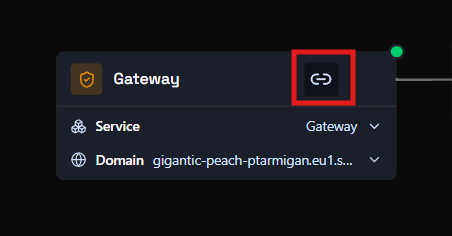
2. Enter your hostname
In the Add custom domain dialog, type the hostname you want to use, for example test.platform201.com.
- Use a hostname on a domain you control.
- Enter only the hostname: no
https://and no trailing path.
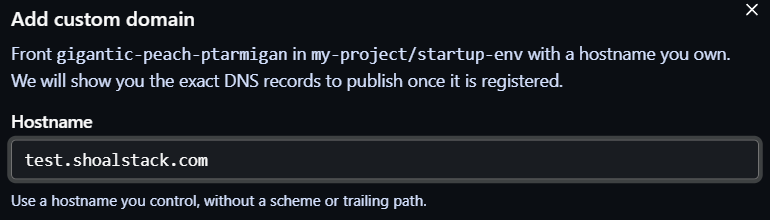
Submit the dialog to register the hostname. platform201 then shows the DNS records you need to publish.
3. Add the DNS records at your DNS provider
The domain now appears with a Pending DNS status, along with two CNAME records. Use the copy buttons to copy each value exactly.
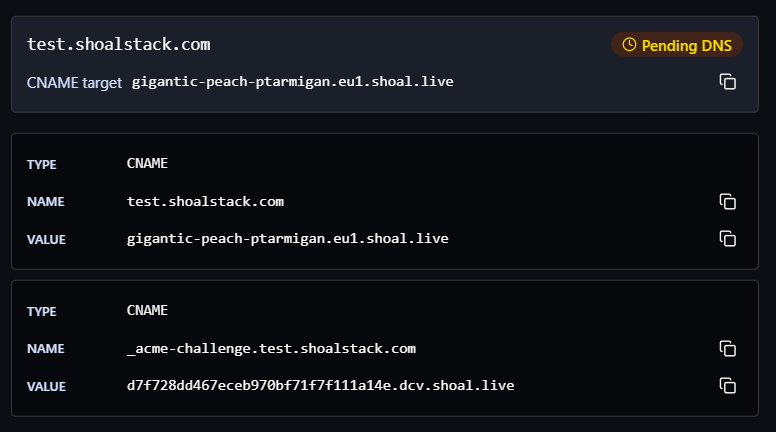
Add both records at your DNS provider:
| Type | Name | Value | Purpose |
|---|---|---|---|
| CNAME | test.platform201.com |
gigantic-peach-ptarmigan.eu1.platform201.live |
Routes traffic for your hostname to the gateway |
| CNAME | _acme-challenge.test.platform201.com |
<token>.dcv.platform201.live |
Lets platform201 verify the domain and issue its SSL certificate |
The values above are examples. Always copy the records shown for your own domain, because the _acme-challenge value is unique to each one.
Record names at your DNS provider
Many DNS providers add your root domain to the record name for you. If yours does, enter only the part before the root domain: test and _acme-challenge.test for the example above. If you enter the full name, some providers end up creating test.platform201.com.platform201.com.
Using Cloudflare?
Set both records to DNS only (grey cloud), not proxied. With the proxy on, platform201 can't verify the domain or issue the certificate.
4. Wait for the domain to become active
DNS changes can take anywhere from a few minutes to a few hours to propagate. Once platform201 detects both records and issues the certificate, the status changes from Pending DNS to Active.

Your deployment is now reachable at https://<your-hostname>. Click the external link icon next to the hostname to open it.
Troubleshooting
The domain stays on Pending DNS. Check that both records exist and match the values shown in platform201 exactly. You can look up what DNS currently returns with:
nslookup -type=CNAME test.platform201.com
nslookup -type=CNAME _acme-challenge.test.platform201.com
If nothing comes back, the records haven't propagated yet or were created under the wrong name (see the tip in step 3).
I already have an A record or another record for this hostname.
A hostname can't have a CNAME alongside other records. Remove the existing record for that hostname before adding the CNAME.
Can I use a root domain like mycompany.com?
Most DNS providers don't allow a CNAME on the root domain. Use a subdomain such as app.mycompany.com or www.mycompany.com, or use your provider's CNAME flattening / ALIAS record if it offers one.